


Discord is a popular platform for connecting with friends, communities, and interest groups. However, there might come a time when you need to take a break or leave the platform permanently. Discord provides two options for such scenarios: disabling your account or deleting it permanently. Both options come with distinct implications, and choosing the right one requires a clear understanding of their differences.
In this guide, we’ll break down everything you need to know about disabling and deleting your Discord account, helping you make the best choice for your needs.

Disabling Your Discord Account
Disabling your account is like hitting the pause button on your Discord activity. It allows you to step away temporarily while keeping all your data intact.
Key Features of Disabling an Account
1. Account Recovery
You can reactivate your account anytime by simply logging back in with your credentials. All your settings, friends, messages, and server memberships will remain unchanged.
2. Impact on Profile Visibility
Your profile will still be visible, showing your username, profile picture, bio, badges, connected accounts, and roles in mutual servers. However, your status will appear as offline.
3. Messages and Friends
- Your messages will remain accessible to your friends, and they can still view previous conversations.
- Friends will still see you in their friends list, but they won’t know you’ve disabled your account.
4. Servers and Roles
You will retain your memberships and roles in all servers you’ve joined. However, if you own any servers, you must transfer ownership or delete the servers before disabling your account.
5. Friend Requests
Friend requests sent to you during the disabled period will be stored and await your approval when you reactivate your account.
6. Discord Nitro Subscription
Your Nitro subscription will remain active unless you cancel it separately. Be sure to manage this subscription before disabling your account if you don’t wish to continue paying.
7. Difference from Logging Out
Disabling logs you out across all devices and requires server ownership transfer. Logging out, on the other hand, doesn’t affect server ownership or membership.
Deleting Your Discord Account
Deleting your account is a permanent decision and should only be chosen if you’re sure you won’t return to Discord.
Key Features of Deleting an Account
1. Account Recovery
After initiating the deletion process, you have a 14-day grace period to change your mind. Simply log back in and select Restore Account to halt the deletion.
2. Data Loss
Once the 14-day period expires, all account data is permanently erased. Make sure to back up any critical information before proceeding.
3. Profile Visibility
After deletion, your profile disappears. Your previous messages will be attributed to Deleted_user, and no one can interact with your account.
4. Messages and Friends
- Your messages remain visible to others but will no longer show your username.
- You’ll be automatically removed from friends’ lists.
5. Servers and Roles
You are automatically removed from all servers, and your roles are deleted. Server ownership must be transferred before deleting your account.
6. Nitro Subscription
To delete your account, you must cancel your Nitro subscription. Discord won’t let you delete the account while the subscription is active.
7. Reusing Email and Username
After deletion is complete, you can use the same email and username to create a new account—provided the username hasn’t been claimed by someone else.

Key Differences Between Disabling and Deleting Your Account
| Feature | Disabling Account | Deleting Account |
|---|---|---|
| Account Recovery | Reactivated anytime by logging in. | Permanent after 14 days grace period. |
| Data Loss | None; all data remains intact. | Complete data loss after 14 days. |
| Profile Visibility | Visible with offline status. | No profile; messages show as Deleted_user. |
| Messages and Friends | Friends and messages unaffected. | Removed from friends; messages attributed to Deleted_user. |
| Server Participation | Retain memberships; ownership transfer required. | Automatically removed from all servers. |
| Friend Requests | Stored and can be approved after reactivation. | Cannot receive friend requests. |
| Nitro Subscription | Remains active unless canceled. | Must be canceled before deletion. |
| Reusing Email & Username | Not applicable; account is reactivated. | Possible after 14 days if username is available. |
How to Disable or Delete Your Discord Account
Before Proceeding
- Server Ownership: Transfer or delete any servers you own.
- Nitro Subscription: Unsubscribe from Discord Nitro if deleting your account.
Steps to Disable or Delete
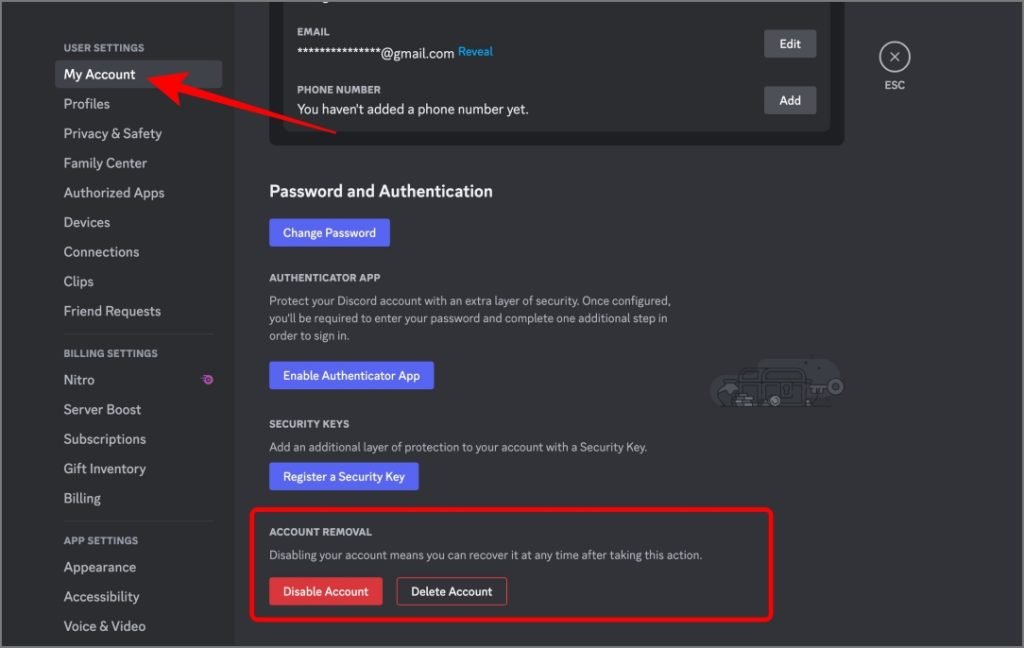
- Open the Discord app or log in to the website.
- Navigate to Settings by clicking the cog icon near your username.
- Go to My Account and select either Disable Account or Delete Account.
- Enter your Discord password for confirmation.
On Mobile:
- Open the app and tap the profile icon in the bottom bar.
- Access Settings via the cog icon at the top.
- Under Account, choose Disable or Delete Account, and confirm with your password.

Think Before You Delete
Choosing between disabling or deleting your Discord account is a decision that depends on your needs and future intentions.
- Disable your account if you need a temporary break while keeping your connections and data intact.
- Delete your account if you’re certain you won’t return and wish to sever all ties with Discord.
Always ensure you’ve backed up important information, transferred server ownership, and canceled subscriptions before proceeding.

Frequently Asked Questions (FAQs)
1. What happens to my messages if I disable my account?
Your messages remain visible to others in chats. They won’t know your account is disabled.
2. Can I receive direct messages if my account is disabled?
No, you cannot receive DMs while your account is disabled, but friends can still send messages, which will be stored.
3. How long does it take to delete a Discord account?
Deletion is finalized 14 days after initiation.
4. Can I restore my account after initiating deletion?
Yes, during the 14-day grace period, you can restore your account by logging in.
5. Will my Nitro subscription remain active if I disable my account?
Yes, your Nitro benefits continue unless you manually cancel the subscription.
By understanding the implications of disabling or deleting your Discord account, you can make an informed choice that aligns with your goals. Whether you’re taking a short break or leaving the platform permanently, the process is straightforward and allows for thoughtful decision-making.