


WhatsApp has revolutionized the way we communicate, offering a blend of simplicity, privacy, and security. Among its robust features is the Lock Chat function, designed to safeguard sensitive conversations. This feature lets users keep private messages, photos, and videos secure from unauthorized access.
If you’ve ever wondered how to unlock and view locked chats on WhatsApp, this guide provides step-by-step instructions, helpful insights, and tips to ensure you can navigate the feature effectively.
What is Locking Chats on WhatsApp?
A Powerful Privacy Tool
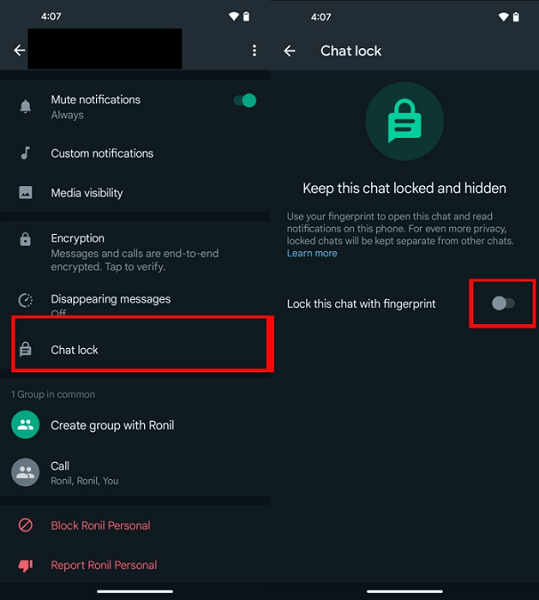
The Lock Chat feature on WhatsApp offers an additional layer of security, ensuring that your sensitive conversations remain private. This is especially useful when you share your device or want to keep certain chats hidden.
Benefits of Locking Chats
- Enhanced Privacy: Locked chats are concealed from the main chat list, making it harder for others to stumble upon them.
- Prevention of Accidental Deletion: Once locked, chats are better protected from accidental removal.
- Media Storage Management: Media in locked chats is not downloaded automatically, saving valuable storage space.
A Use Case Example
Imagine sharing your phone with a friend to show photos. The Lock Chat feature ensures that they won’t accidentally open your sensitive conversations while browsing.
How to Unlock and View Locked Chats on WhatsApp
Step-by-Step Instructions to Unlock Chats
- Open WhatsApp: Launch the app and navigate to the Locked Chats section.
- Locate the Locked Chat: Scroll through the list of locked conversations and identify the one you wish to unlock.
- Tap and Hold: Press and hold the chat until a menu appears.
- Select “Unlock”: Tap the unlock option in the menu.
- Authenticate: Enter the passcode, pattern, fingerprint, or Face ID you set for locked chats. Once verified, the chat will unlock and move to the main chat list.
Key Tips
- Always use a strong passcode to maintain your chat’s security.
- Unlock chats only on secure devices to avoid compromising privacy.

How to View Locked Chats
Accessing the Content After Unlocking
Once a chat is unlocked, it becomes visible in the main chat list. You can open it like any other conversation to view messages, photos, and videos. Importantly, unlocking the chat does not notify the other person in the conversation.
Turning Off the Lock Chat Feature Entirely
If you prefer not to lock any chats, you can disable the feature:
- Navigate to WhatsApp settings by tapping the three dots in the top-right corner.
- Select Privacy and then tap Chat Lock.
- Toggle off the Lock Chat feature.
- Authenticate your identity to confirm.
Privacy Features Compared to Other Apps
Telegram
- PIN Lock for Chats: Allows users to secure chats or the entire app with a PIN.
- Secret Chat: Messages self-destruct after a specified duration.
Signal
- Screen Security: Prevents screenshots in private conversations.
- Disappearing Messages: Deletes messages after a set time.
While WhatsApp’s Lock Chat feature provides robust security, Telegram and Signal cater to users who prefer more granular control over their privacy settings.
Frequently Asked Questions (FAQs)
1. Can I recover a forgotten passcode for a locked chat on WhatsApp?
No, WhatsApp does not offer a recovery option for forgotten passcodes. The only solution is resetting app settings, which deletes all locked chats.
2. Does unlocking a chat notify the other participant?
No, unlocking a chat is entirely private. The other person won’t receive any notification.
3. Is the Lock Chat feature secure?
Yes, when paired with a strong device passcode or biometric authentication, the feature ensures robust privacy.
4. Can I lock multiple chats on WhatsApp simultaneously?
Yes, each chat can be locked individually, allowing you to secure multiple conversations based on your preferences.
5. What happens if I delete a locked chat?
Deleting a locked chat removes it permanently from your device. Ensure you back up important conversations before deleting them.
Conclusion
The Lock Chat feature on WhatsApp empowers users with an effective tool to secure their private conversations. From keeping sensitive chats hidden to managing media downloads, it ensures robust privacy and control.
By following the steps outlined in this guide, you can easily unlock and view your locked chats while maintaining security. Whether you decide to keep your chats locked or turn off the feature altogether, WhatsApp provides a seamless experience tailored to your privacy needs.
For enhanced security, always use a strong passcode, keep your device updated, and explore WhatsApp’s full range of privacy features to protect your communication.