


Discord is a versatile platform widely used by gamers, creators, and communities worldwide. Whether you need a break from its constant notifications or have decided to part ways permanently, Discord offers two main options: disabling and deleting your account. Each option has distinct implications for your data, subscriptions, and profile. This guide will help you make an informed decision and walk you through the process step by step.
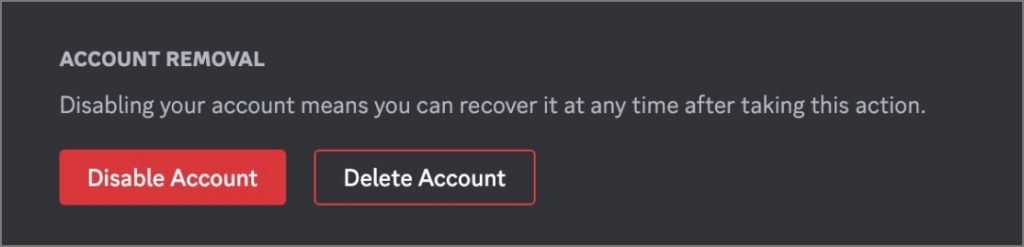
Disabling Your Discord Account
Disabling your Discord account is akin to pausing it. This option is ideal if you need a temporary break but plan to return later.
What Happens When You Disable Your Account
1. Account Recovery
Disabling your account does not erase it. You can reactivate it at any time by logging back in with your credentials. All your settings, messages, friends, and server memberships remain intact.
2. Profile Visibility
When your account is disabled, your profile, including your username, profile picture, bio, and mutual friends, remains visible to others. However, your status will show as offline, similar to being logged out.
3. Server Membership and Friend Requests
You’ll remain part of all servers you’re a member of, and your roles on those servers won’t change. Additionally, new friend requests will still be received but will remain pending until you reactivate your account.
4. Discord Nitro Subscription
If you have a Discord Nitro subscription, it continues even when your account is disabled. To avoid recurring charges, it’s recommended to deactivate the subscription before disabling your account.

Deleting Your Discord Account
Deleting your Discord account is a permanent action that removes your presence from the platform. While there’s a brief grace period to change your mind, deletion results in irreversible consequences.
What Happens When You Delete Your Account
1. Account Recovery
Once deleted, your account enters a 14-day grace period during which you can restore it. After this period, recovery is impossible, and all associated data is permanently lost.
2. Data and Profile Removal
Your profile is erased, and your username is replaced with Deleted_user. Friends will no longer see your profile or be able to message you, and your messages will appear under the generic name Deleted_user.
3. Server Membership and Ownership
You’ll be automatically removed from all servers you belong to. If you own any servers, you must transfer ownership to another member before deleting your account.
4. Discord Nitro Subscription
You cannot delete your account without first canceling any active Discord Nitro subscriptions. Failure to do so will block the deletion process.
Key Differences Between Disabling and Deleting Your Discord Account
| Feature | Disabling Account | Deleting Account |
|---|---|---|
| Account Recovery | Can be reactivated anytime by logging in. | Only recoverable during a 14-day grace period. |
| Data Loss | No data loss; everything stays intact. | Permanent data loss after 14 days. |
| Profile Visibility | Visible but marked as offline. | Profile deleted; messages appear as Deleted_user. |
| Impact on Friends | Friends and messages remain unaffected. | Unfriended; messages categorized under Deleted_user. |
| Server Participation | Membership and roles remain unchanged. | Automatically removed from servers. |
| Friend Requests | Requests are received and can be approved later. | No new friend requests accepted. |
| Nitro Subscription | Continues unless deactivated separately. | Must be canceled before deletion. |
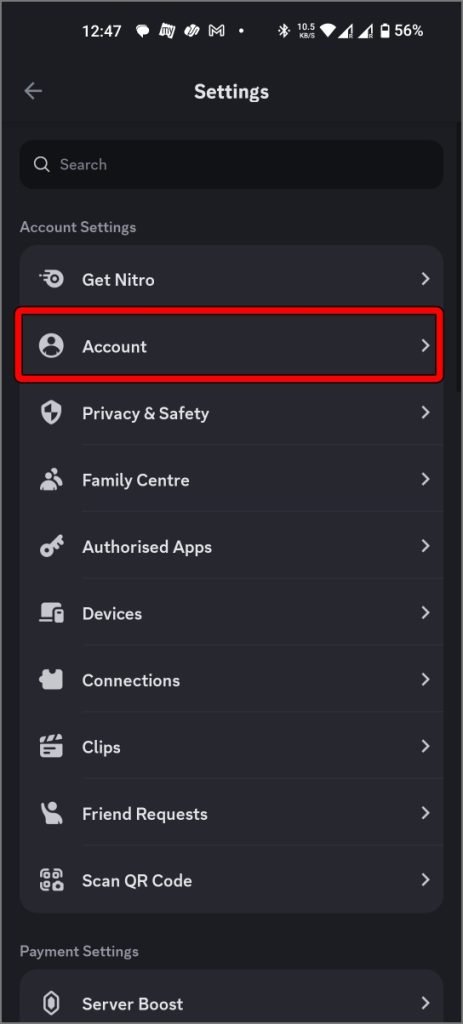
How to Disable or Delete Your Discord Account
Steps to Disable Your Discord Account
- Open the Discord app or log in via the website.
- Click the Settings (gear) icon next to your username.
- Navigate to My Account and select Disable Account.
- Enter your password to confirm.
Steps to Delete Your Discord Account
- Open the Discord app or website and log in.
- Go to Settings, then My Account.
- Select Delete Account.
- Enter your password and follow the on-screen prompts.
- If you own any servers, transfer ownership to another member before proceeding.
FAQs
1. Can I recover my Discord account after deleting it?
No, but you have a 14-day grace period during which you can restore your account. After this, recovery is impossible.
2. Will my Nitro subscription continue if I disable my account?
Yes, your Nitro subscription will remain active. You’ll need to deactivate it manually to avoid recurring charges.
3. What happens to my messages if I delete my account?
Your messages will remain in servers or direct messages, but they’ll appear under the name Deleted_user.
4. Do I need to transfer server ownership before deleting my account?
Yes, you must transfer ownership of any servers you own before deleting your account. Failing to do so will prevent the deletion process.
5. Can I use my old email to create a new account after deletion?
Yes, you can reuse your old email to create a new account, but you may need to choose a new username if the old one has been claimed.
Conclusion
Choosing whether to disable or delete your Discord account depends on your intentions and future plans. Disabling your account is a temporary solution, ideal for taking a break while preserving your data and connections. Deleting your account, on the other hand, is a permanent step that removes all traces of your presence from the platform.
Before making your decision, ensure that you cancel any subscriptions, back up important data, and transfer server ownership if needed. Weigh the pros and cons carefully to align your choice with your long-term goals. Whether you disable or delete your account, understanding the implications will help you proceed confidently.