


3 Fixes for Vibration Not Working on Android
If you rely on your phone’s vibration to stay discreetly notified about calls or messages, encountering problems with this feature can be frustrating. This guide will walk you through step-by-step solutions to fix vibration issues on your Android phone, assuming you’ve installed the latest OS update.

1. Check and Adjust Vibration Settings
The first step is to ensure your phone’s vibration settings are correctly configured. Often, a simple tweak in the settings can restore functionality.
Steps to Adjust Vibration Settings:
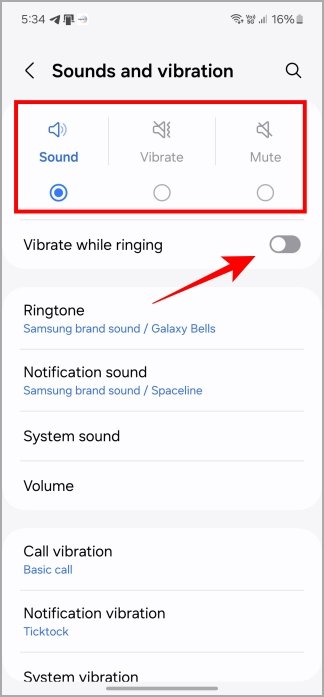
- Open Settings and navigate to Sounds and vibration.
- If your phone uses the Sound profile, enable Vibrate when ringing. Alternatively, switch to the Vibrate profile for vibrate-only notifications.
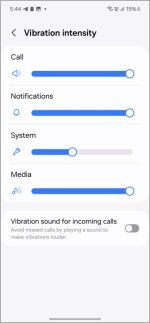
- Customize vibration patterns for specific notifications, such as calls, text messages, or alerts, and adjust the vibration intensity to differentiate between them.
Additional Tip:
For those with newer models like the Samsung Galaxy S24, explore its AI vibration pattern customization for enhanced user experience.

2. Test Your Phone’s Vibration Motor
If tweaking settings doesn’t resolve the issue, the problem might stem from a hardware failure in the vibration motor. Testing it can help confirm this.
How to Test the Vibration Motor:
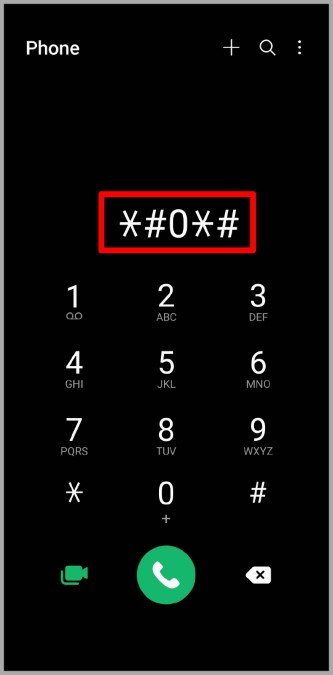
- Open the Phone app and dial #06#.
- A hidden diagnostic menu will appear. Tap on Vibration to test the motor.
- If your phone vibrates during the test, the motor is functional, and the issue might lie elsewhere. If it doesn’t, a hardware repair may be required.
3. Reset App Preferences
Sometimes, custom app settings can interfere with your phone’s vibration function. Resetting app preferences can restore default settings and resolve such issues.
Steps to Reset App Preferences:
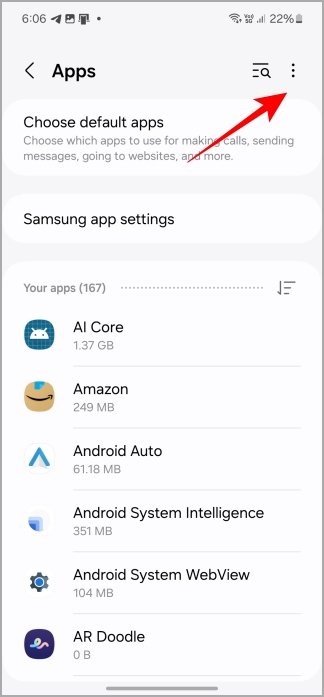
- Open Settings and go to Apps.
- Tap the three-dot menu icon in the top-right corner and select Reset app preferences.
- Confirm your choice. This action will reset disabled apps, permissions, notification preferences, and app defaults without erasing personal data.

When to Use This Solution:
- If vibration stopped working after installing a specific app.
- When system-level settings were modified unintentionally.
4. Additional Troubleshooting Tips
If the above steps don’t work, here are more solutions to try:
- Restart Your Phone: A force restart can resolve temporary glitches, including vibration issues.
- Check for Software Updates: Ensure your device is running the latest version of Android, as updates often fix bugs affecting features like vibration.
- Remove Problematic Apps: Recently installed third-party apps may conflict with vibration settings. Uninstall them and check if the issue resolves.
- Visit a Repair Center: If none of the above works, the vibration motor may need professional repair or replacement.
Frequently Asked Questions (FAQs)
1. Why is my phone not vibrating when I receive notifications?
This could be due to incorrect vibration settings, a software glitch, or a malfunctioning vibration motor. Try the solutions in this guide to identify and resolve the issue.
2. How do I enable vibration for calls and notifications?
Go to Settings > Sounds and vibration, then enable Vibrate when ringing or select the Vibrate profile for all notifications.
3. Can I repair my phone’s vibration motor myself?
Testing the vibration motor through the dialer menu (#06#) can help identify hardware issues. However, repairing the motor typically requires professional expertise.
4. What does resetting app preferences do?
Resetting app preferences restores all disabled apps, permissions, and notification settings to their defaults, which may fix vibration issues caused by configuration errors.
5. Will factory resetting my phone fix vibration issues?
A factory reset should only be used as a last resort, as it erases all data and settings. First, try the simpler solutions outlined in this guide.
Conclusion
Vibration issues on Android phones can often be resolved by checking and adjusting vibration settings, testing the motor, or resetting app preferences. In most cases, these simple steps will help restore this essential feature, ensuring you never miss important calls or notifications. If hardware problems persist, consult a professional repair service for assistance.
By following these steps, you can confidently troubleshoot and fix vibration problems, keeping your phone functional and convenient.