

The device you sold, gave away or left in a drawer still holds a working copy of your identity. A factory reset does not revoke it.
There is a phone in a drawer in most houses. It is three or four years old, the screen has a hairline crack, and it has not been switched on since the day the new one arrived. It is also, in a very practical sense, still somebody’s account.
The same is true of the laptop you sold on a marketplace, the tablet your children outgrew, the router you replaced when the broadband contract changed, and the smart speaker now living in a box in the loft. Hardware gets passed on constantly. The sessions attached to it usually do not get cleaned up at all.
A factory reset is not the end of the job
The instruction people follow — back up, erase, restore — is genuinely the right idea, and it is genuinely incomplete. On a modern phone, erasing the device does not necessarily sign you out of anything. It removes the local copy of your data. The sessions live on the server side, and they stay valid until something revokes them.
So the first step is not the reset. It is signing out of everything, from the account settings of a device you are keeping — email, cloud storage, social accounts, shopping apps, banking. Then remove the device from your account’s list of trusted devices. Then erase it.
If you skip that order, you can hand over a phone that has been wiped clean and still carries an activation lock tied to your account, or a tablet that a new owner cannot set up because it is still enrolled in your family group. That is the polite version of the problem.
The other common surprise is the family group. A device enrolled in a shared account can still receive messages, calendar invitations and photo shares long after it has left your house, and the new owner may see notifications meant for you before they see anything else.
What actually travels with the hardware
Some of it is obvious: photos, messages, call history. Some of it is not.
- The SIM or eSIM. Identity, phone number and stored contacts, in a piece of plastic small enough to be lost in a pocket.
- The memory card, if there is one. Factory resets famously do not touch removable storage.
- Saved Wi-Fi networks, which include the credentials for networks you no longer think about, including the one at work.
- Session tokens in apps that were restored from a backup and never properly signed out. These are the interesting ones, because they can work without a password.
- The device’s own identifiers — its serial number and the advertising ID — which recur in analytics long after you have stopped owning it.
- If the device will never be used again and the data genuinely matters, destroy the storage rather than trusting a wipe you cannot verify.
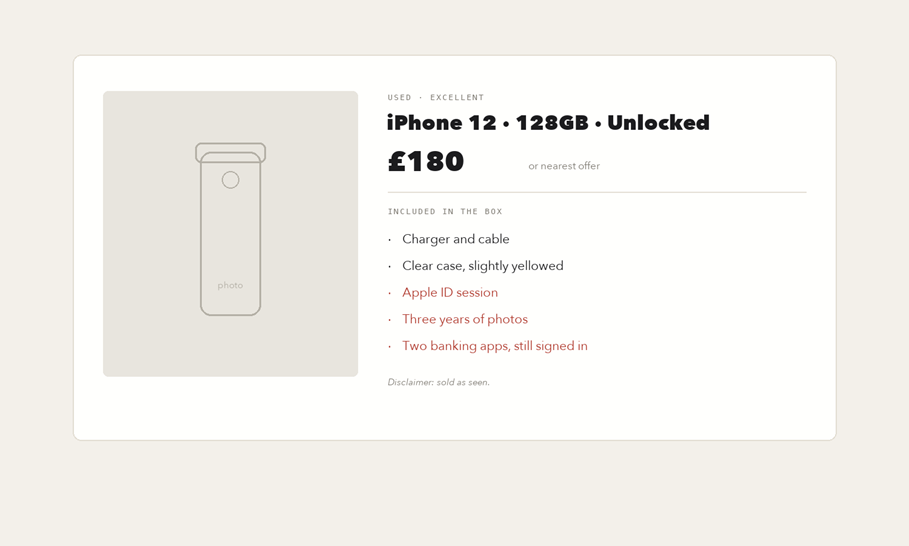
Nobody writes this list in the listing. It travels anyway.
It is not only phones
The devices people forget are the ones that were never personal in the first place. A router holds the credentials for every network it has joined, which is a surprisingly useful thing to inherit. A smart television holds sessions for streaming accounts and, quite often, a payment method. A printer may still have the last document somebody scanned sitting in its memory, because nobody ever deletes that.
None of this is exotic. They are the ordinary appliances of a connected house, and they change hands constantly — at car boot sales, in marketplace listings, in the skip outside an office that has just refitted.
The rule is the same one that applies to phones, and it is worth saying plainly: the device is not the asset. The accounts it is logged into are the asset. Everything else is packaging.
Where it ends up
Most second-hand devices are resold honestly and wiped competently. Enough are not that the trade in recovered accounts is a standing feature of the market rather than an occasional accident.
A refurbisher that buys in bulk, wipes what it can and resells quickly does not always check whether an account is still attached. A private seller who does not know how to sign out of a cloud account will hand you a device with their photo library still reachable. And the intermediate case is the worst one: a device that looks clean, was wiped correctly on the surface, and still has a working session token sitting in an app’s data directory.
Data recovered this way does not stay local for long. It joins the general flow of breached and abandoned credentials. There is a reason dark web explained is one of the most searched phrases on this subject: most people arrive at it after something has already happened, and want to know where their information went.
The practical consequence is that a wiped phone can still be a working credential, and a credential is worth more than the handset. That asymmetry explains the whole trade. Nobody is buying your cracked screen for parts. They are buying the session.
The timing is what catches people out. A device sold in spring can surface in a credential list in autumn, by which point the original owner has changed the password they remember and forgotten the four they do not. The gap between the sale and the consequence is usually long enough that nobody connects the two.
There is a fair argument that this is a platform problem rather than a seller problem. A marketplace could require a device to be signed out before a listing goes live. None of them do, and in the absence of that requirement the only person who can close the session is the one who opened it.
If you want to see the shape of that market, read a walkthrough of how to access dark web sites safely, and read it as a warning rather than an invitation. Most of what is for sale is stale, most of the sellers are unreliable, and the version of your data being auctioned is rarely current. That is cold comfort when it is your inbox.
Doing it properly, in order
- Sign out of every account on the device, then revoke the device from each account’s security settings.
- Remove the SIM and any memory card. Keep the SIM, destroy it if the number is no longer needed.
- Encrypt, then erase. On most phones, an encrypted wipe is what makes the recovered data unreadable rather than merely unlinked.
- Check the listing before you sell. If it still shows your name, your email or your photographs, it is not ready.
- When buying, ask the seller to sign out in front of you, and set the device up as new rather than restoring someone else’s backup.
The part nobody thinks about
A device is not a container of data. It is a credential. It has been authenticated to services on your behalf for years, and those services will keep honouring it until somebody tells them not to.
Which means the question is not “did I delete the photos?” The question is “did I revoke the identity?” Those are different jobs, and only one of them is on the setup screen.
Notes for the editor
- Angle: a gadgets-and-devices piece about credentials rather than data recovery.
- Links: two contextual, both to explainsafe-reading material rather than to instructions.
- Images: one original illustration, also supplied as a standalone PNG.
- No device vendor is criticised; the piece targets process, not brands.